

DreamSnaps can feel mysterious because the game shows tag requirements, a final score, a rank, and a reward, but it does not show exactly how individual voters responded. The clearest place to start is separating confirmed rules from community strategy.
- Required tags make your submission eligible.
- Every regular vote has the same value.
- Submitting early or late does not change your voting result.
- More qualifying objects do not replace a clear, appealing photograph.
How voting turns into rank
When people vote, the game presents two randomly selected DreamSnaps side by side. JaxsBerryPatch, our Community Valley Creator created an explainer that describes each choice as a head-to-head result: one entry earns the vote and the other does not. Across the comparisons your photo receives, a stronger share of wins can lead to a higher rank.
This helps explain why a photo you love can place below another entry. The two photos may have appeared in different matchups, against different competition, and in front of different voters. A strong entry can face several equally strong photos, while another may be compared with simpler submissions. Gameloft does not publish the exact ranking formula, so this is a useful community model rather than a guaranteed calculation.
Moonstone reward tiers
Every valid submission earns at least 300 Moonstones. Higher percentile placements earn larger rewards, while the top five ranks receive special fixed amounts. The Dreamlight Valley Wiki labels the percentile cutoffs below as approximate values gathered from community data.
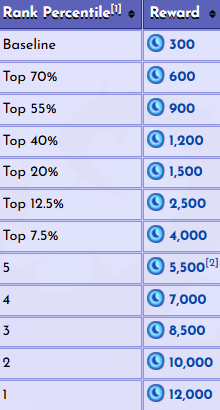
- Baseline participation: 300 Moonstones.
- Top 70%: 600 Moonstones.
- Top 55%: 900 Moonstones.
- Top 40%: 1,200 Moonstones.
- Top 20%: 1,500 Moonstones.
- Top 12.5%: 2,500 Moonstones.
- Top 7.5%: 4,000 Moonstones.
- Rank 5: 5,500 Moonstones; Rank 4: 7,000; Rank 3: 8,500; Rank 2: 10,000; Rank 1: 12,000.
What required and bonus tags do
Every challenge includes required tags. Your outfit or furniture must satisfy them before the game accepts your submission. Use the DreamSnaps filter in Wardrobe or Furniture Mode to qualify quickly, then stop treating the tag counter as the whole creative goal.
- 1Meet the requirements
Place or wear enough qualifying items for the submission check to pass.
- 2Build a readable theme
Choose a setting, mood, and story that a voter can recognize immediately.
- 3Remove visual dead weight
Extra tagged objects are not helping if they hide the subject or make the frame confusing.
- 4Choose the strongest thumbnail
Submit the version that reads best when it is shown small beside another image.
Win the first second
Voters compare images quickly. Before you decorate, finish the sentence “This photo shows…” If that sentence is difficult to answer, or the image needs a long explanation, the idea probably needs a clearer focal point.

A seven-step build process
- 1Turn the theme into one sentence
Define the story before placing decor. “A traveler discovering an abandoned observatory” gives you a clearer direction than simply collecting space-themed items.
- 2Choose one focal point
Your avatar, a doorway, a table setting, or a striking piece can lead the image. Use light, color, contrast, or open space to make it obvious.
- 3Build in three layers
Use a restrained foreground to frame the shot, a midground for the main story, and a background that establishes place without stealing attention.
- 4Control the edges
Scan for awkward crops, objects growing out of the avatar, accidental empty corners, and bright distractions near the frame.
- 5Light the subject, not everything
Put the brightest or warmest light near the focal point and let secondary areas become quieter. Test multiple times of day outdoors.
- 6Check the thumbnail
Step back or view the screenshot on your phone. The subject, theme, color contrast, and overall silhouette should survive at small size.
- 7Take several versions
Try wide, medium, and close crops; change the pose, camera height, and lighting; then compare the screenshots instead of choosing the one that took longest to build.
Common DreamSnaps myths
- “I need to submit on the first day.” No. Gameloft says submission timing does not affect voting or the result.
- “More required-tag items always mean a better rank.” Meet the requirements, but do not sacrifice composition to inflate a counter.
- “A high score guarantees a specific Moonstone reward.” Placement and reward depend on how the submission performs within that challenge.
- “A busy photo looks more impressive.” Intentional detail helps only while the subject and theme remain easy to read.
Touch of Magic warning
Touch of Magic items can block a DreamSnaps submission even when they are hidden behind other objects or just outside the visible frame. The detection area extends outward from the camera.
- 1Use the camera toggle
Hide Touch of Magic furniture from the Camera menu and try the submission again.
- 2Move items farther away
If the photo is still blocked, temporarily remove the item or move it well beyond the camera’s detection area.
- 3Recheck after changing the camera
Rotating or repositioning the camera can change what is detected, so confirm the tag requirements again.
Thirty-second final check
- All required tags are satisfied.
- The theme is understandable immediately.
- There is one obvious focal point.
- Foreground, midground, and background feel intentional.
- The brightest light supports the subject.
- No distracting object touches the avatar’s silhouette.
- The image still works at thumbnail size.
- Touch of Magic items are not blocking submission.
- This is the strongest crop, not simply the widest one.
Sources and references
- JaxsBerryPatch on Instagram: How DreamSnaps rankings and Moonstone rewards work ↗
- Dreamlight Valley Wiki: DreamSnaps scoring and Moonstone reward tiers ↗
- Gameloft Help Center: How DreamSnaps scoring works ↗
- Gameloft Help Center: The value of each vote ↗
- Gameloft Help Center: Submission timing ↗
- Gameloft Help Center: Touch of Magic detection ↗